🧠 Mastering JavaScript Fundamentals
A Step-by-Step Guide to Interactive Web Development
Including ES6+, Error Handling & jQuery
📌 What is JavaScript?
JavaScript (JS) is a programming language primarily used in websites to make pages interactive:
- Animate elements
- Respond to clicks & inputs
- Create games & dynamic forms
- Fetch data from servers
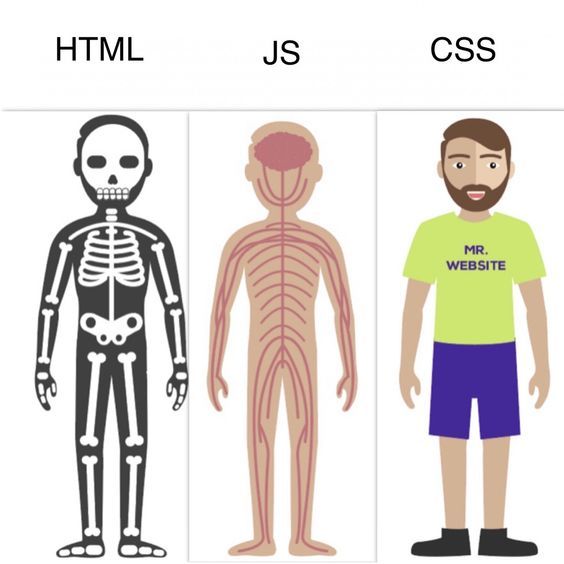
🧩 The Web Analogy
🏗️ HTML = Skeleton (structure)
🎨 CSS = Clothes (style)
🧠 JavaScript = Brain (interactivity)
🚀 How to Write & Run JavaScript
Browser Console
Right-click → Inspect → Console tab
HTML File
Add <script> tags
Online Editors
CodePen, JSFiddle, JSBin
// Method 2: In HTML file
<script>
    console.log('Hello from JavaScript!');
</script>

// Or external file
<script src="script.js"></script>
🧺 Variables - Storing Values
let name = "Alex";           // Text (string)
let age = 20;                // Number
let isStudent = true;        // Boolean
let items = ["a", "b"];       // Array
let person = {name: "Jo"};   // Object
let = Reassignable variable
const = Constant (cannot reassign)
var = Old keyword (avoid)
Naming Rules
• Start with letter, _, or $
• Case-sensitive
• Use camelCase convention
📢 Data Types
| Type | Example | Description |
|---|---|---|
| String | "Hello", 'World' | Text |
| Number | 10, 3.14 | Integer or decimal |
| Boolean | true, false | True or False |
| null | null | Intentionally empty |
| undefined | undefined | Not yet defined |
| Symbol | Symbol('id') | Unique identifier |
| BigInt | 9007199254740991n | Large integers |
typeof "hello"  // "string"
typeof 42       // "number"
typeof true     // "boolean"
➕ Operators
Arithmetic
5 + 3   // 8 (add)
10 - 2  // 8 (subtract)
2 * 4   // 8 (multiply)
16 / 2  // 8 (divide)
2 ** 3  // 8 (power)
10 % 3  // 1 (modulo)
Assignment
let x = 5;
x += 3;  // x = 8
x -= 2;  // x = 6
x *= 2;  // x = 12
x++;     // x = 13
x--;     // x = 12
String Concatenation & Template Literals
let name = "Lina";
let msg1 = "Hello, " + name;           // Concatenation
let msg2 = `Hello, ${name}!`;          // Template literal (ES6)
🔍 Comparison & Logical Operators
Comparison
== | Equal (value) | 5 == "5" ✅ |
=== | Strict equal | 5 === "5" ❌ |
!= | Not equal | 5 != 6 ✅ |
!== | Strict not equal | 5 !== "5" ✅ |
> < >= <= | Comparisons | 8 > 6 ✅ |
Logical
// AND - both must be true
true && true   // true

// OR - at least one true
true || false  // true

// NOT - inverts value
!true          // false
💡 Always use === and !==
⚖️ Conditional Statements
if / else if / else
let score = 85;

if (score >= 90) {
    console.log("A");
} else if (score >= 80) {
    console.log("B");
} else {
    console.log("C");
}
Ternary Operator
let age = 18;
let status = age >= 18
    ? "Adult"
    : "Minor";
Switch Statement
switch(day) {
    case 1: return "Mon";
    case 2: return "Tue";
    default: return "?";
}
🧩 Functions - Reusable Code
// Function Declaration
function greet(name) {
    return `Hello, ${name}!`;
}

// Function Expression
const add = function(a, b) {
    return a + b;
};

// Arrow Function (ES6)
const multiply = (a, b) => a * b;

// Default Parameters
const welcome = (name = "Guest") => `Hi, ${name}`;
💡 Arrow functions don't have their own this context
🔁 Loops - Repeating Actions
for Loop
for (let i = 0; i < 5; i++) {
    console.log(i);
}
// 0, 1, 2, 3, 4
while Loop
let i = 0;
while (i < 3) {
    console.log(i++);
}
for...of (Arrays)
const arr = ["a", "b", "c"];
for (const item of arr) {
    console.log(item);
}
for...in (Objects)
const obj = {x: 1, y: 2};
for (const key in obj) {
    console.log(key, obj[key]);
}
📦 Arrays
let fruits = ["apple", "banana", "mango"];

fruits[0]          // "apple" (index starts at 0)
fruits.length      // 3
fruits.push("orange")     // Add to end
fruits.pop()              // Remove from end
fruits.unshift("kiwi")    // Add to start
fruits.shift()            // Remove from start
Modern Array Methods
const nums = [1, 2, 3, 4, 5];

nums.map(n => n * 2)        // [2, 4, 6, 8, 10]
nums.filter(n => n > 2)     // [3, 4, 5]
nums.reduce((a,b) => a+b)  // 15
nums.find(n => n > 3)       // 4
nums.includes(3)          // true
🧱 Objects
const student = {
    name: "Amadou",
    age: 20,
    grades: [85, 90, 78],
    getAverage() {
        return this.grades.reduce((a,b) => a+b) / this.grades.length;
    }
};

student.name              // "Amadou"
student["age"]            // 20
student.getAverage()      // 84.33
student.school = "MIT";   // Add property
Destructuring (ES6)
const {name, age} = student;
const [first, ...rest] = [1, 2, 3];  // first=1, rest=[2,3]
🌐 DOM Manipulation
DOM = Document Object Model (page structure as objects)
// Selecting Elements
const el = document.getElementById('myId');
const els = document.querySelectorAll('.myClass');
const btn = document.querySelector('button');

// Modifying Elements
el.textContent = "New text";
el.innerHTML = "<strong>Bold</strong>";
el.style.color = "red";
el.classList.add("active");

// Events
btn.addEventListener('click', () => {
    alert('Clicked!');
});
🛡️ Error Handling
try {
    // Code that might fail
    let result = riskyOperation();
} catch (error) {
    // Handle the error
    console.error("Error:", error.message);
} finally {
    // Always runs
    console.log("Cleanup done");
}

// Throwing custom errors
function divide(a, b) {
    if (b === 0) throw new Error("Cannot divide by zero");
    return a / b;
}
⏳ Asynchronous JavaScript
Callbacks
setTimeout(() => {
    console.log("After 1s");
}, 1000);
Promises
fetch('/api/data')
    .then(r => r.json())
    .then(d => console.log(d))
    .catch(e => console.error(e));
Async/Await (ES8)
async function getData() {
    try {
        const res = await fetch('/api');
        const data = await res.json();
        return data;
    } catch (err) {
        console.error(err);
    }
}
💡 async/await makes asynchronous code look synchronous and easier to read
✨ ES6+ Modern Features
Spread Operator
const arr1 = [1, 2];
const arr2 = [...arr1, 3, 4]; // [1,2,3,4]

const obj1 = {a: 1};
const obj2 = {...obj1, b: 2}; // {a:1,b:2}
Optional Chaining
const val = obj?.prop?.nested;
// Returns undefined if any is null
Nullish Coalescing
const val = null ?? "default";
// "default" (only for null/undefined)
Classes
class Animal {
    constructor(name) {
        this.name = name;
    }
    speak() {
        console.log(`${this.name} sounds`);
    }
}
💎 jQuery - Write Less, Do More
jQuery is a fast, small JavaScript library that simplifies DOM manipulation
Include jQuery
<!-- CDN -->
<script src="https://code.jquery.com/
jquery-3.7.1.min.js"></script>
Document Ready
// Wait for DOM to load
$(document).ready(function() {
    // Your code here
});

// Short version
$(function() {
    // Your code here
});
Why jQuery?
- Simplified DOM manipulation
- Easy event handling
- Built-in animations
- AJAX made simple
- Cross-browser compatibility
💡 $ is an alias for jQuery
🎯 jQuery Selectors
| Vanilla JS | jQuery | Description |
|---|---|---|
document.getElementById('id') | $('#id') | By ID |
document.getElementsByClassName('c') | $('.c') | By Class |
document.querySelectorAll('p') | $('p') | By Tag |
document.querySelector('[data-x]') | $('[data-x]') | By Attribute |
// Advanced selectors
$('ul li:first')          // First li in ul
$('input:checked')         // Checked inputs
$('div.active')            // Divs with class active
$('p:contains("hello")')  // P containing "hello"
🔧 jQuery DOM Manipulation
Getting/Setting Content
// Get text content
$('#el').text();

// Set text content
$('#el').text('New text');

// Get/Set HTML
$('#el').html('<b>Bold</b>');

// Get/Set value (inputs)
$('input').val();
$('input').val('new value');
Modifying Elements
// CSS
$('#el').css('color', 'red');
$('#el').css({color: 'red', fontSize: '20px'});

// Classes
$('#el').addClass('active');
$('#el').removeClass('active');
$('#el').toggleClass('active');

// Attributes
$('img').attr('src', 'new.jpg');
🎪 jQuery Events
// Click event
$('#btn').click(function() {
    alert('Clicked!');
});

// Multiple events with on()
$('#input').on('focus blur', function(e) {
    console.log(e.type);
});

// Event delegation (for dynamic elements)
$('ul').on('click', 'li', function() {
    $(this).toggleClass('selected');
});

// Common events: click, dblclick, mouseenter, mouseleave,
// keydown, keyup, submit, change, focus, blur, scroll
🎬 jQuery Effects & Animations
Show/Hide
$('#el').hide();
$('#el').show();
$('#el').toggle();

// With duration (ms)
$('#el').hide(500);
$('#el').show('slow');
Fade
$('#el').fadeIn();
$('#el').fadeOut();
$('#el').fadeToggle();
$('#el').fadeTo(500, 0.5);
Slide
$('#el').slideUp();
$('#el').slideDown();
$('#el').slideToggle();
Custom Animation
$('#el').animate({
    opacity: 0.5,
    left: '+=50px',
    height: '200px'
}, 1000);
📡 jQuery AJAX
// Simple GET request
$.get('/api/data', function(response) {
    console.log(response);
});

// POST request
$.post('/api/submit', {name: 'John', age: 25}, function(res) {
    console.log(res);
});

// Full AJAX control
$.ajax({
    url: '/api/data',
    method: 'POST',
    data: JSON.stringify({id: 1}),
    contentType: 'application/json',
    success: function(res) { console.log(res); },
    error: function(err) { console.error(err); }
});
⚔️ jQuery vs Vanilla JavaScript
| Task | jQuery | Vanilla JS |
|---|---|---|
| Select element | $('#id') | document.getElementById('id') |
| Add class | $el.addClass('x') | el.classList.add('x') |
| Set text | $el.text('Hi') | el.textContent = 'Hi' |
| Click event | $el.click(fn) | el.addEventListener('click',fn) |
| AJAX | $.get(url,fn) | fetch(url).then(fn) |
💡 Modern JS has caught up! Use jQuery for legacy projects or when you need its convenience. For new projects, consider vanilla JS or modern frameworks.
⚠️ Common Beginner Mistakes
- Using
=instead of===for comparison - Forgetting to convert inputs with
Number()orparseInt() - Arrays start at index
0, not1 - Running code before DOM is loaded
- Not handling
nullorundefined - Forgetting parentheses when calling functions:
myFuncvsmyFunc() - Confusing
let/constscope withvar - Not using
async/awaitproperly with Promises
💡 Place <script> at the end of <body> or use defer attribute
🔧 Debugging Tips
1. console.log()
Check values at each step
2. Read Errors
They show line numbers!
3. Breakpoints
Use DevTools debugger
// Useful console methods
console.log("Message");
console.error("Error!");
console.warn("Warning");
console.table([{a:1}, {a:2}]);  // Display as table
console.time('x'); /* code */ console.timeEnd('x');  // Measure time
💪 Errors are part of learning! Test code in small pieces.
🎓 Keep Coding!
📚 Key Takeaways:
- Practice daily (even 20 minutes helps)
- Errors are normal and useful
- Read docs: MDN, JavaScript.info
- Build small personal projects
🚀 Next Steps:
- Master ES6+ features
- Learn a framework (React, Vue, Angular)
- Explore Node.js for backend
- Study TypeScript for type safety
Thank You! 👏